The Best Budget Mesh Routers Under $100 That Actually Deliver Reliable Coverage
Many mesh routers under $100 promise whole-home coverage but often fall short on speed and stability. This guide cuts through the hype to reveal the best budget mesh routers under $100 that provide consistent, fast WiFi for real-world home use.
🔝 Top Picks at a Glance
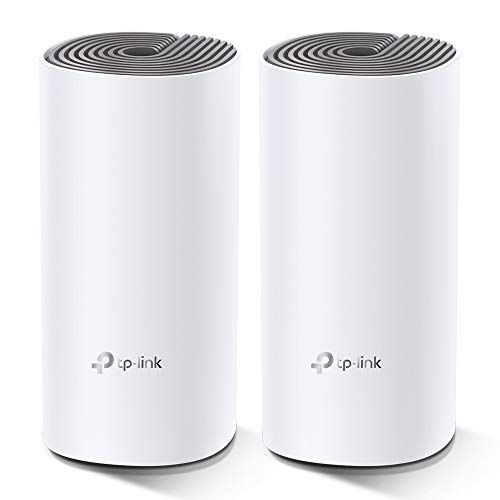
TP-Link Deco E4(2-Pack) Whole Home Mesh WiFi System
Reliable dual-band mesh with easy app setup and good coverage for small to medium homes. Ideal for families needing simple, effective WiFi without extra bells.

Tenda Nova MW3 Mesh WiFi System (3-Pack)
Compact mesh system offering solid coverage and easy management for tight budgets. Best for small apartments or budget-conscious users.

Amazon eero 6 Mesh WiFi System (1-Pack)
Single-unit mesh router with WiFi 6 support offering future-proof speed and solid coverage for smaller homes or as an extender.
🧠 What to Look for Before You Buy
Buying a budget mesh router under $100 isn’t just about snagging the lowest price. Many shoppers chase specs like “WiFi 6” or “gigabit ports” without considering if those features perform well in real homes. The tricky part is balancing coverage, speed, and software ease within tight cost constraints.
Coverage Area vs. Real-World Walls
Mesh routers under $100 often list generous coverage, but real-world obstacles like drywall, metal studs, and furniture dramatically reduce range. Look for models with multiple nodes (2 or 3 packs) if you have a larger or multi-story home. Single-unit “mesh” routers may struggle to blanket bigger spaces, so don’t rely solely on claimed square footage.
Dual-Band vs. Tri-Band
Most budget mesh systems under $100 are dual-band, meaning they share the 2.4GHz and 5GHz frequencies for both router-to-node and node-to-device communication. This can create congestion in busy homes. Tri-band systems with a dedicated backhaul band are rare at this price, so prioritize strong signal and smart band steering over fancy frequency setups.
App & User Interface Quality
Affordable mesh routers often skimp on user-friendly apps or reliable firmware updates. Check that the system offers a simple app for setup and ongoing management, including parental controls or device prioritization if needed. Avoid models with buggy or outdated software, as that’s a common pain point.
Warranty & Support
Under $100, warranty terms vary widely. Some brands offer generous 2- or 3-year warranties and responsive support, which can save you headaches down the line. When in doubt, investing slightly more for better after-sales service is worth it. This is especially important for tech you rely on daily.
If you're also shopping for car tech gadgets, our Best Car Tech Gadgets Under $100 (2026) – Smart Upgrades That Won't Break the Bank covers the best picks.
🟦 TP-Link Deco E4 (2-Pack) — Best Overall
TP-Link has built a solid reputation for budget networking gear that works well without complicated setup. The Deco E4 2-pack stands out by balancing stable performance, coverage, and ease of use at a price rarely matched by competitors.
Who it's for
Ideal for homes up to 2,000 square feet needing straightforward mesh coverage without complex features or steep learning curves. Perfect for families wanting stable WiFi for streaming and casual gaming.
Real-world performance
The Deco E4 delivers consistent speeds on both 2.4GHz and 5GHz bands with automatic band steering that helps devices connect to the best frequency. Setup is painless with the Deco app guiding you step-by-step. While it’s only dual-band, the system’s internal algorithms do a good job managing traffic to avoid slowdown. One caveat: under very high device loads, speeds can dip, but this is rare in typical home environments.
Value assessment
At just under $100 for a two-node system, the Deco E4 offers coverage and performance that outpace similarly priced rivals. The inclusion of robust parental controls and QoS features—rare in this price range—adds to its value.
Verdict: The TP-Link Deco E4 is the best budget mesh router under $100 for most home users seeking reliable coverage without overspending.
🟩 Tenda Nova MW3 (3-Pack) — Best Budget Pick
This compact 3-pack from Tenda offers a surprisingly strong mesh network for an even lower price point than the Deco E4. It’s a solid value choice for tight budgets with modest coverage needs.
Who it's for
Great for small apartments or budget-conscious buyers who want whole-home mesh WiFi without extras like advanced controls or WiFi 6. Also good for second homes or occasional use.
Real-world performance
The Nova MW3 provides decent speeds on 2.4GHz and 5GHz bands with seamless roaming between nodes. Setup is straightforward through the Tenda WiFi app, though the app’s feature set is basic compared to higher-end models. Performance-wise, it handles streaming and browsing well but struggles with multiple simultaneous high-bandwidth tasks. The 3-pack layout helps cover tricky layouts better than a 2-pack but expect some speed loss behind walls.
Value assessment
For around $70-$85, this is a no-frills mesh system that gets the job done. Sure, it lacks advanced features and WiFi 6, but for the price, it’s a bargain that competes well with pricier options.
Verdict: The Tenda Nova MW3 is the best budget mesh router for buyers who want simple, affordable whole-home WiFi without bells and whistles.
🟨 Amazon eero 6 (1-Pack) — Best Long-Term Value
Amazon’s eero 6 single-unit mesh router edges into the budget category with WiFi 6 support, future-proofing your network. It’s a smart investment for buyers willing to spend slightly more now for faster speeds and better longevity.
Who it's for
Best for smaller homes or as an extender to an existing mesh system. Buyers who want WiFi 6 benefits—like improved device handling and speed—without paying for full tri-band mesh packs.
Real-world performance
The eero 6 delivers strong, consistent WiFi 6 speeds on both bands and handles multiple devices better than older tech. Its compact design fits unobtrusively in any room. Compared to the Deco E4, it offers faster throughput and better latency for gaming or 4K streaming but covers less area with a single unit. Users report rock-solid app support and regular updates, which improve reliability.
Value assessment
While priced near $100, the eero 6’s WiFi 6 tech and solid build make it a worthwhile long-term buy. It costs a bit more than older dual-band mesh nodes but offers better future compatibility and performance that justifies the premium.
For more on budget routers, see our Best Budget Routers Under $100 (2026 Picks Compared).
Verdict: The Amazon eero 6 is the best long-term value mesh router under $100 for buyers seeking future-ready WiFi 6 performance.
📊 Side-by-Side Comparison
TP-Link Deco E4 (2-Pack)
- Easy app setup
- Dual-band with good range
- Parental controls included
Tenda Nova MW3 (3-Pack)
- Affordable 3-pack
- Compact design
- Simple app management
Amazon eero 6 (1-Pack)
- WiFi 6 support
- Compact design
- Reliable app and updates
*Prices are approximate and may change. Always check the live price on Amazon before buying.
✅ Our Recommendation
For most budget shoppers, the TP-Link Deco E4 offers the best blend of coverage, performance, and features under $100. If you’re pinching pennies but still want mesh coverage, the Tenda Nova MW3 delivers decent whole-home WiFi at a lower price. For those prioritizing future-proofing with WiFi 6, the Amazon eero 6 single unit is worth the extra dollars.
- Best overall: TP-Link Deco E4 (2-Pack) — Balanced performance and features for typical homes
- Best budget pick: Tenda Nova MW3 (3-Pack) — Affordable mesh with solid coverage for smaller spaces
- Best long-term value: Amazon eero 6 (1-Pack) — WiFi 6 tech for future-ready speed
Before you buy, you might also want to check out our Affordable Car Tech for New Drivers 2026 – Smart, Practical Gadgets Under $100 for complementary tech picks.
❓ Frequently Asked Questions
What is the difference between dual-band and tri-band mesh routers under $100?
Most mesh routers under $100 are dual-band, which means they use the same 2.4GHz and 5GHz bands for both connecting your devices and linking nodes. Tri-band models add a dedicated band for node-to-node communication, reducing congestion and improving speeds, but tri-band mesh systems rarely fall under $100. For budget buyers, a strong dual-band system with good placement often performs better than a poorly positioned tri-band.
Is WiFi 6 worth it in mesh routers under $100?
WiFi 6 offers faster speeds and better device management but typically costs more than $100 for mesh systems. The Amazon eero 6 single-unit router is an exception, providing WiFi 6 in this price bracket. If you have newer devices and want future-proofing, it’s worth considering. Otherwise, dual-band WiFi 5 mesh routers deliver solid performance for most users.
Can I mix mesh routers from different brands under $100?
Generally, mesh systems are designed to work best with their own brand’s nodes and software. Mixing brands often leads to compatibility issues and loss of mesh benefits like seamless roaming. For budget shoppers, stick to one brand’s system for best results.
How much coverage can I expect from a 2-pack mesh system under $100?
A 2-pack budget mesh system typically covers around 1,500 to 2,000 square feet in ideal, open conditions. Walls and floors reduce this, so a multi-pack or a strategically placed extender might be necessary for larger or multi-story homes.
How do I know if a mesh router is the right choice over a single high-powered router?
Mesh routers excel in homes with dead zones or complex layouts. A single high-powered router might suffice in small, open apartments. For related mesh and router options, see our Best Budget Routers Under $100 (2026 Picks Compared).