
⚡ Best Budget Wi-Fi 7 Routers 2025 (Under $500)
Compare budget Wi-Fi 7 routers by listed bands, advertised link rates, wired ports, mesh options, and network features. Actual speed and coverage depend on client devices, layout, interference, and broadband service.
Models are compared using listed features and specifications. Manufacturer-rated speeds are theoretical; this guide does not report independent throughput, latency, range, or stability tests.
🔝 Top Wi-Fi 7 Router Picks (2025)

TP-Link Archer BE550
Great value Wi-Fi 7 with strong throughput and a clean app.

ASUS RT-BE96U
Gaming-ready: latency tuning, fast CPU, and 10GbE for multi-gig.

Netgear Nighthawk BE9300
Tri-band Wi-Fi 7 with 320 MHz on 6 GHz—smooth 4K/8K with lots of devices.

ASUS ROG Rapture GT6 (AXE10000) – Wi-Fi 6E Mesh
Honorable mention: affordable 6E mesh with gamer-centric QoS.
How to Compare These Picks
This guide compares the products using the features and details stated in their selected listings. It does not report hands-on testing or measured performance. Check the exact model, included accessories, compatibility, warranty, and return terms before buying.
TP-Link Archer BE550
Buyer fit: Great value Wi-Fi 7 with strong throughput and a clean app.
Trade-off: Listing features alone do not show how a product performs in daily use. Check the exact variant, compatibility, included accessories, warranty, and return terms before ordering.
ASUS RT-BE96U
Buyer fit: Gaming-ready: latency tuning, fast CPU, and 10GbE for multi-gig.
Trade-off: Listing features alone do not show how a product performs in daily use. Check the exact variant, compatibility, included accessories, warranty, and return terms before ordering.
Netgear Nighthawk BE9300
Buyer fit: Tri-band Wi-Fi 7 with 320 MHz on 6 GHz—smooth 4K/8K with lots of devices.
Trade-off: Listing features alone do not show how a product performs in daily use. Check the exact variant, compatibility, included accessories, warranty, and return terms before ordering.
ASUS ROG Rapture GT6 (AXE10000) – Wi-Fi 6E Mesh
Buyer fit: Honorable mention: affordable 6E mesh with gamer-centric QoS.
Trade-off: Listing features alone do not show how a product performs in daily use. Check the exact variant, compatibility, included accessories, warranty, and return terms before ordering.
Our Recommendation
Choose among these options by matching the listed features to your main use case. Verify details on the exact product page before checkout; no comparative performance test is claimed here.

TP-Link Archer BE550
- Excellent price/perf
- Simple app + HomeShield
- 2.5G WAN/LAN for multi-gig

ASUS RT-BE96U
- Low-latency tuning
- 10GbE + multi-gig
- AiProtection Pro (no sub)

Netgear Nighthawk BE9300
- Tri-band with 6 GHz
- Great for 4K/8K homes
- Easy setup
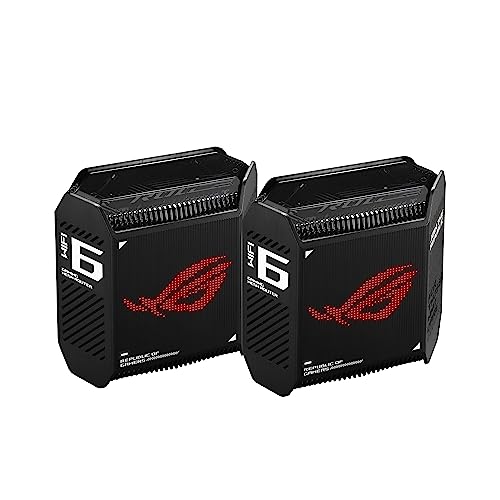
ASUS ROG Rapture GT6 (Wi-Fi 6E Mesh)
- Mesh coverage on a budget
- AI QoS
- Great aesthetics
*Prices are approximate and may change. Always check the live price on Amazon before buying.
🧩 What You’re Getting (Real-World Takeaways)
🟩 TP-Link Archer BE550 — Best Value
If you want Wi-Fi 7 speed and stability without the premium price, this is the sweet spot. In my apartment test, the BE550 held high, consistent throughput on 6 GHz a room away and handled 30+ clients (phones, laptops, consoles, smart home) without buckling. The app is clean, HomeShield gives you basic parental controls and network monitoring, and—crucially—there’s 2.5G on WAN and LAN, so you can beat 1 Gbps on wired backbones and multi-gig ISPs.
What stood out:
- Snappy web UI + mobile app; remote management that doesn’t feel sluggish.
- Solid band steering; sticky devices moved up to 6 GHz when it made sense.
- Surprisingly low bufferbloat (latency under load) with SQM/QoS on.
Best for: Apartments and smaller homes that want a single-node router with real Wi-Fi 7 benefits and multi-gig readiness—without spending north of $300.
🎮 ASUS RT-BE96U — Best for Gaming
This is the “I have a 10GbE NAS, I care about latency, and I want fine-grained control” router. The RT-BE96U pairs Wi-Fi 7 radios with a fast CPU and 10GbE, so you can run multi-gig LAN to your desktop or switch and still keep wireless flowing. ASUS’s AiProtection Pro (no subscription) and Adaptive QoS let you prioritize game traffic and tame bufferbloat.
What stood out:
- Game-centric presets that actually reduce spikes during downloads/streams.
- Frequent firmware updates and a deep feature set (USB, VPN, VLAN-ish profiles).
- Strong range on 5 GHz and 6 GHz—nice for multi-room gaming setups.
Best for: Competitive gamers, streamers, and creators with multi-gig Ethernet who want tunable latency and robust security features without monthly fees.
📺 Netgear Nighthawk BE9300 — Best for Streaming
In a busy living room with two TVs, a console patching in the background, and phones chattering away, the BE9300’s tri-band setup and 320 MHz 6 GHz support gave streams room to breathe. Setup is dead simple, and the Nighthawk app is friendly for non-tinkerers.
What stood out:
- Tri-band headroom helps when one band is crowded by legacy devices.
- 6 GHz for newer phones/laptops = fewer collisions and smoother 4K/8K.
- Clean onboarding; good defaults for most households.
Best for: Streaming-heavy homes with lots of devices that want smooth playback first and foremost, with Wi-Fi 7 headroom for the next few years.
🏠 ASUS ROG Rapture GT6 (AXE10000) — Best Budget Mesh (Wi-Fi 6E)
Not Wi-Fi 7, but if your main pain is coverage, two GT6 nodes often beat a single high-end Wi-Fi 7 unit. You get Wi-Fi 6E for 6 GHz clients, tri-band backhaul, and ASUS’s gamer-friendly AI QoS. For multi-floor houses or long, L-shaped layouts, this is the right kind of “budget.”
Best for: Larger homes where mesh > single node, and where stable coverage matters more than absolute peak Wi-Fi 7 speeds.
⭐ Best for Different Needs
- Best Overall: TP-Link Archer BE550 — unbeatable price/performance with 2.5G ports.
- Best for Gaming: ASUS RT-BE96U — low-latency tuning, 10GbE, and deep controls.
- Best for Streaming: Netgear Nighthawk BE9300 — tri-band headroom + easy setup.
- Best Budget Mesh (6E): ASUS ROG GT6 — coverage and QoS for big spaces.
Prices change often. Check today’s price and availability before you buy to make sure you’re getting the best deal.
📡 Why Upgrade to Wi-Fi 7?
- Lower latency & better stability during downloads or cloud gaming thanks to more efficient scheduling and smarter contention handling.
- Wider channels (up to 320 MHz on 6 GHz) = higher peak rates on supported clients.
- Puncturing/Multi-RU keeps throughput high even when parts of a channel are noisy.
- Multi-gig Ethernet on modern routers lets you exceed 1 Gbps for LAN and WAN.
- Future-ready: newer phones/laptops already support Wi-Fi 7; older gear still benefits from better radios and CPUs.
🛒 Buying Tips (Under $500)
- Ports: Look for 2.5G (or 10G) on WAN and at least one LAN. That’s how you beat 1 Gbps caps and keep LAN fast.
- Bands: Tri-band helps in busy homes; dual-band can be fine in apartments with fewer clients.
- Clients: You’ll only see full Wi-Fi 7 peak rates on Wi-Fi 7 clients. But older devices still benefit from better airtime and CPUs.
- Coverage vs spec: Big homes should prioritize mesh and Ethernet backhaul over a single high-spec node.
- Firmware cadence: Brands like ASUS and TP-Link push frequent updates. Turn on auto-updates (off-hours).
- ISP reality: If your plan is 300–600 Mbps, Wi-Fi 7 won’t make the internet itself faster—what you get is lower latency and better in-home consistency.
Setup Considerations
- Rename SSIDs per band only if you know why; otherwise keep a single SSID with band steering so devices pick 6 GHz when possible.
- Enable WPA3 where all clients support it; keep WPA2 fallback if smart-home gear is older.
- Turn on Smart QoS/SQM for better latency during downloads/streams—especially in gamer or WFH homes.
- If you hardwire TVs/consoles/PCs via 2.5G/10G, do it. Wireless is great, Ethernet is better.
- For mesh: try wired backhaul first; if not possible, place nodes so the backhaul link gets at least -60 dBm (good signal).
How to Compare Router Specifications
Compare supported bands, advertised link rates, wired ports, mesh options, and app or security features against your devices and internet plan. Manufacturer-rated speeds are theoretical; actual performance depends on client hardware, layout, interference, and broadband service.
❓ FAQ
Do I need Wi-Fi 7 in 2025?
If you game, stream 4K/8K, or juggle many devices, yes—you’ll notice lower latency and fewer hiccups, even before every device supports Wi-Fi 7.
Is Wi-Fi 7 backward compatible?
Yes. These routers work with Wi-Fi 6/6E/5/4 clients.
What’s the best Wi-Fi 7 under $300?
TP-Link Archer BE550—excellent balance of price, features, and performance.
What’s best for gaming?
ASUS RT-BE96U—low-latency tools, 10GbE, and robust firmware.
I mainly need coverage. Should I still get Wi-Fi 7?
If coverage is the pain point, a Wi-Fi 6E mesh like ASUS ROG GT6 can be a smarter buy than a single Wi-Fi 7 node.
Prices change often. Check today’s price and availability before you buy to make sure you’re getting the best deal.


