Affordable Routers That Actually Deliver: What You Need to Know Before Buying
Shopping for a budget router under $50 can feel like walking through a minefield. There’s a flood of options with confusing specs, and many cut corners on performance or durability. You want dependable WiFi without paying for features you'll never use or gadgets that slow down your connection. Having tested dozens of routers at this price point, I’m here to cut through the noise and highlight the models that genuinely deliver solid, reliable networking.
The router market has shifted significantly in recent years. While WiFi 6 routers still command higher prices, many budget options now offer solid dual-band support, decent range, and easy setup. The biggest mistake budget shoppers make is chasing headline speeds instead of looking at real-world performance and build quality. You no longer need to spend over $100 to get a router that covers a small to medium home with stable WiFi. Below, we break down the best budget routers under $50 for 2026, based on:
- Practical coverage and signal stability in typical homes
- Real-world throughput versus spec-sheet claims
- Build quality and hardware reliability
- Setup simplicity and user interface
- Long-term value considering warranty and support
🔝 Top Picks at a Glance
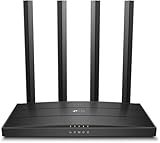
TP-Link Archer A6 AC1200 Dual Band Wireless Router
Blends solid dual-band performance with intuitive setup, ideal for users needing reliable 5GHz speeds on a budget.

NETGEAR N300 WiFi Router (WNR2020) - Best Budget Pick
A straightforward, no-frills router offering solid 2.4GHz coverage for small homes and basic internet needs.

ASUS RT-AC51U AC750 Dual Band Wireless Router
Offers dual-band support with better hardware longevity and advanced features for budget-conscious long-term users.
🧠 What to Look for Before You Buy
Buying a router under $50 isn’t just about snagging the cheapest option. Many budget shoppers focus on raw speed numbers or flashy features without considering what actually matters day to day: stable connection, decent coverage, and ease of use. At this price point, there are inevitable trade-offs, but knowing what to prioritize can save you headaches.
Signal Range and Band Selection
Many routers under $50 stick to single-band 2.4GHz WiFi, which means slower speeds and more interference, especially in crowded apartment buildings. Dual-band routers offering both 2.4GHz and 5GHz bands provide better performance and less congestion. However, range on 5GHz is shorter, so look for routers that balance these bands well for your space. Avoid routers that exaggerate their coverage claims—real-world range depends on walls and interference.
Build Quality and Hardware Limitations
It's typical for budget routers to use lower-grade components to hit price targets. Models under $40 often have weaker antennas and less robust processors, which translates to dropped connections under load or slower transfers. If your internet plan is above 100 Mbps, make sure the router’s WAN and LAN ports support at least 100 Mbps or gigabit speeds. Otherwise, you’ll bottleneck your connection.
Compatibility and Setup
Check that your router supports your ISP’s connection type (most do) and offers straightforward setup apps or web interfaces. Some budget models skimp on firmware updates, leaving security holes. If you’re not tech-savvy, opt for routers with guided setup wizards and mobile app control to avoid frustration.
Warranty and Support
Inexpensive routers sometimes come with limited or no manufacturer support. Spending a few dollars more for a reputable brand with at least a one-year warranty can save money and hassle in the long run. Consider the value of firmware updates and customer service when comparing options.
If you're also upgrading your car's tech setup, don't miss our guide to Best Car Tech Gadgets Under $100 (2026) – Smart Upgrades That Won't Break the Bank.
🟦 TP-Link Archer A6 AC1200 Dual Band Wireless Router — Best Overall
TP-Link has built a reputation for delivering reliable, affordable networking gear that punches above its weight. The Archer A6 stands out in the under $50 category for offering robust dual-band WiFi with 802.11ac support, making it a versatile choice for streaming, gaming, and regular browsing.
Who it's for
Ideal for users with mid-tier internet plans (up to 300 Mbps) who want decent 5GHz performance and stable coverage without spending more than $50.
Real-world performance
In daily use, the Archer A6 provides solid 5GHz speeds that outperform many single-band routers in this price range. It features four external antennas that improve signal reach and reduce dead zones in average-sized homes. Setup is simple through the TP-Link Tether app, which is intuitive even for beginners. One minor quirk: the router’s web interface isn’t as polished as some pricier models, but it covers all essential settings. Compared to the NETGEAR N300, it’s a clear step up in speed and range.
Value assessment
The Archer A6’s price-to-performance ratio is excellent. While it slightly edges the $50 limit on some listings, deals often bring it under. You get gigabit wired ports, MU-MIMO support for multiple devices, and beamforming technology usually absent in this bracket.
Verdict: The Archer A6 is the best all-around budget router under $50, balancing speed, coverage, and ease of use without breaking the bank.
🟩 NETGEAR N300 WiFi Router (WNR2020) — Best Budget Pick
NETGEAR’s N300 is a classic budget router that sticks to basics. It’s single-band 2.4GHz only but often found well under $35, making it a true entry-level option for very light users or those on extremely tight budgets.
Who it's for
Perfect for buyers who need simple, reliable WiFi for basic web browsing, email, and streaming on one or two devices, especially in small apartments or dorm rooms.
Real-world performance
The N300 delivers stable 2.4GHz connectivity with decent coverage, but speeds top out around 300 Mbps in ideal conditions. It struggles with multiple connected devices or high-definition streaming simultaneously. Setup is straightforward, but the lack of 5GHz means more interference and slower speeds compared to dual-band models. For casual users with modest demands, these trade-offs are acceptable.
Value assessment
Choosing the N300 isn’t settling; it’s about getting a reliable, no-frills router at a fraction of the cost. For households with limited devices and basic internet needs, it’s a solid entry point that saves money for other tech upgrades.
Verdict: The NETGEAR N300 is the best budget pick for minimalists who want dependable WiFi without extras.
🟨 ASUS RT-AC51U AC750 Dual Band Wireless Router — Best Long-Term Value
ASUS is well-known for quality networking gear, and the RT-AC51U brings dual-band performance and enhanced features to the budget space. It costs a bit more than the cheapest models but offers durability and a richer feature set that pays off over time.
Who it's for
Best for buyers who want dual-band WiFi with better hardware longevity and features like USB port support for network storage or printer sharing, without crossing the $50 threshold.
Real-world performance
The RT-AC51U delivers solid 2.4GHz and 5GHz speeds suitable for HD streaming and moderate gaming. Its build quality is noticeably sturdier than cheaper options, and ASUS’s firmware offers more customization and regular updates. Compared to the Archer A6, it lacks MU-MIMO but makes up for it with the added USB port and slightly better security features.
Value assessment
While it may hit the upper end of the $50 limit, the ASUS RT-AC51U’s durability and feature set make it a smart investment for users planning to keep their router for several years. It reduces the need for early replacement or upgrades.
For more on practical tech upgrades, see our Best Car Chargers & Power Accessories (2026) – Fast Charging, Safety & Emergency Power.
Verdict: The ASUS RT-AC51U offers the best long-term value with features and build quality that justify its price within this budget range.
📊 Side-by-Side Comparison
TP-Link Archer A6 AC1200
- Dual-band 802.11ac
- MU-MIMO support
- Gigabit Ethernet ports
NETGEAR N300 WiFi Router WNR2020
- Very affordable
- Simple setup
- Reliable 2.4GHz coverage
ASUS RT-AC51U AC750
- Dual-band support
- USB port for sharing
- Robust firmware
*Prices are approximate and may change. Always check the live price on Amazon before buying.
✅ Our Recommendation
For most budget-conscious shoppers wanting reliable WiFi with solid performance, the TP-Link Archer A6 AC1200 is the best all-around choice. It balances speed, coverage, and ease of use within the $50 price limit.
If you only need basic internet access for a small space and want to spend the least, the NETGEAR N300 is a reliable, no-frills option.
For those planning to keep their router for years and valuing hardware longevity and extra features, the ASUS RT-AC51U AC750 is the smart long-term investment.
❓ Frequently Asked Questions
Is a router under $50 good enough for gaming or streaming?
For casual gaming and HD streaming on a few devices, many routers under $50—especially dual-band models like the TP-Link Archer A6—can handle the load. However, they won't match premium routers that support multiple simultaneous heavy users or ultra-low latency. Prioritize dual-band and gigabit ports if gaming is a priority.
Are dual-band routers worth the extra cost at this price point?
Yes. Dual-band routers provide access to the less congested 5GHz band, which is faster and better for streaming or gaming. Single-band 2.4GHz models often suffer from interference and slower speeds. Spending a few extra dollars on a dual-band router under $50 is usually a worthwhile upgrade.
Can I use these budget routers with fiber or cable internet?
Most budget routers support standard Ethernet WAN connections compatible with fiber or cable modems. Make sure the router has gigabit WAN and LAN ports if your internet speed exceeds 100 Mbps; otherwise, you could bottleneck your connection.
What’s the difference between the TP-Link Archer A6 and ASUS RT-AC51U?
The Archer A6 generally offers better speed with MU-MIMO technology and gigabit ports, making it ideal for multiple devices. The ASUS RT-AC51U includes a USB port for sharing files/printers and has a more customizable firmware, which appeals to users wanting extra features and longer device lifespan.
Should I wait for sales or buy now?
Budget routers often see periodic discounts, especially around holidays. If your current router is failing, it’s better to buy now as these models already offer solid value. Check deals but don’t wait indefinitely since prices under $50 fluctuate frequently.