Affordable Graphic Tablets That Don’t Compromise on Performance
Buying a graphic tablet for digital art in 2026 can be tricky if you’re on a budget. The market is flooded with models boasting high resolution, pressure sensitivity, and fancy features — but many cheap options fall short in real use, with laggy pens, poor build quality, or weak driver support. This guide cuts through the hype to highlight solid, affordable tablets that artists can rely on without spending a fortune.
In recent years, the technology powering budget graphic tablets has improved significantly, so you no longer need to spend $200+ to get smooth pen tracking and decent drawing area. However, many shoppers still chase specs like resolution or pressure levels without considering driver stability or compatibility, which are critical for a frustration-free creative experience.
In this guide we tested and evaluated the best cheap graphic tablets of 2026, weighing:
- Build quality vs. price-point reality
- Real-world pen performance and pressure sensitivity
- Driver compatibility and OS support
- Drawing surface size and active area usability
- Long-term value including warranty and customer support
🔝 Top Picks at a Glance

XP-Pen Deco 01 V2 Drawing Tablet
Large active area and excellent pen accuracy make this the best overall budget tablet for artists who want professional-grade features without breaking the bank.

Huion H610 Pro V2 Graphics Drawing Tablet
An excellent budget pick for artists who want a generous drawing area and customizable buttons at a very affordable price.
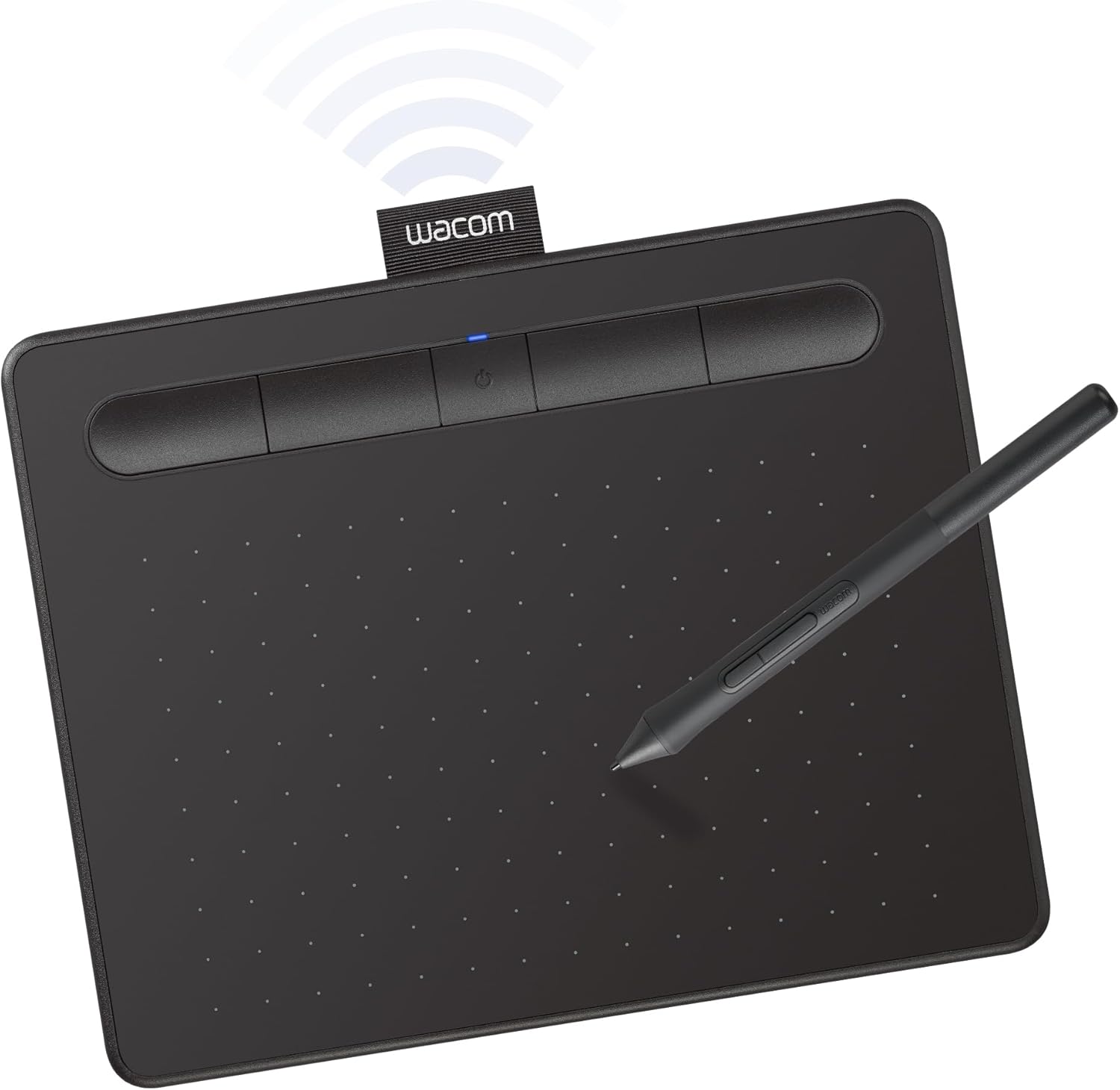
Wacom Intuos Small Bluetooth Drawing Tablet
Best long-term value with Wacom’s renowned build quality and reliable drivers, ideal for artists who want a trusted brand and wireless convenience.
🧠 What to Look for Before You Buy
Choosing a cheap graphic tablet isn’t just about picking the one with the highest resolution or most pressure levels on paper. Many budget shoppers make the mistake of chasing specs while ignoring critical factors like driver stability, pen lag, or build quality — all of which directly impact your drawing experience.
Pen Performance & Pressure Sensitivity
Pressure sensitivity determines how naturally your strokes respond to pen pressure changes. In budget tablets, it’s common to find exaggerated claims (e.g., 8192 levels) that don’t translate well in practice. Look for tablets with stable pen drivers and consistent pressure curves rather than just pushing specs. For example, XP-Pen and Huion models tend to offer reliable pressure sensitivity and smooth lines, while generic brands often show jitter or lag.
Build Quality & Drawing Surface
Tablets under $100 often compromise on materials or pen comfort. Avoid models with flimsy plastic or tiny active areas that stifle creativity. A smooth matte surface that mimics paper texture is ideal to prevent hand fatigue. Also, consider tablet size: a larger active area (8 x 5 inches or above) is more comfortable for detailed artwork, but if portability is key, smaller options like Wacom Intuos Small work well.
Compatibility & Connectivity
Check if the tablet supports your operating system (Windows, macOS, sometimes Linux). Bluetooth is a bonus for wireless convenience but can introduce slight latency. Before buying, verify the tablet’s drivers are regularly updated. For example, Wacom’s driver support is rock solid, whereas some budget brands lag behind. If you work on multiple devices, USB-C support is helpful.
Warranty & Customer Support
Budget tablets vary in warranty quality. Spending a few extra dollars on a brand with responsive customer service can save headaches down the line. Some tablets include pen nib replacements and extra accessories, adding to long-term value.
If you’re also interested in tech gadgets that enhance your workspace or daily routine, check out our Best Budget Tech Gadgets 2025 – Top Amazon Finds Under $50 for smart, affordable upgrades.
🟦 XP-Pen Deco 01 V2 — Best Overall
XP-Pen has carved out a strong reputation for delivering professional-grade features in budget tablets. The Deco 01 V2 stands out for its large 10 x 6.25-inch active drawing area and excellent pen accuracy with minimal lag, making it a top pick for artists serious about digital art.
Who it's for
This tablet is perfect for beginner to intermediate artists who want a large workspace and reliable pen sensitivity without paying Wacom prices.
Real-world performance
The Deco 01 V2’s battery-free stylus responds smoothly and accurately, with 8192 pressure levels that feel natural in programs like Photoshop and Clip Studio Paint. The tablet’s matte surface offers a comfortable drawing texture and the overall build feels sturdy. Setup was straightforward on both Windows and macOS, with few driver hiccups. One minor quibble: the tablet’s shortcut buttons can be a bit stiff but programmable.
Value assessment
Priced around $70, it offers features typically found in tablets costing $150+. The large active area alone makes it a great value for artists who want room to create without awkward zooming or panning.
Verdict: The XP-Pen Deco 01 V2 combines size, performance, and build quality into a budget-friendly package that beats many pricier competitors.
🟩 Huion H610 Pro V2 — Best Budget Pick
The Huion H610 Pro V2 is a no-frills, affordable drawing tablet offering a generous 10 x 6.25-inch active area and solid pen pressure performance at a very wallet-friendly price.
Who it's for
Ideal for artists who want the largest possible drawing surface under $65 and are okay trading some premium features for value.
Real-world performance
The pen supports 8192 pressure levels, and while it’s not as refined as the XP-Pen Deco 01 V2, it’s surprisingly consistent for the price. Setup can require manual driver updates, but once running, its responsiveness is good for sketching and line work. The build is plastic but durable enough for daily use. It lacks Bluetooth connectivity, so expect a wired connection.
Value assessment
While it doesn’t have the polish of more expensive models, its large size and decent pen accuracy make it a solid choice for art students or hobbyists on a tight budget.
Verdict: The Huion H610 Pro V2 delivers impressive drawing space and pen functionality for very little money, making it the best budget pick.
🟨 Wacom Intuos Small Bluetooth — Best Long-Term Value
Wacom’s brand is synonymous with quality and reliability. The Intuos Small Bluetooth model offers a compact active area with wireless connectivity, making it a smart long-term investment for artists who want stability and comfort.
Who it's for
Best suited for casual artists and professionals who want a trustworthy, durable tablet with Bluetooth to reduce cable clutter.
Real-world performance
The Wacom pen is battery-free and provides precise pressure sensitivity with smooth curves. The smaller active area (6 x 3.7 inches) is less ideal for large, detailed artwork but perfect for line art, photo retouching, or note-taking. The wireless connection is stable with minimal latency. Wacom’s driver updates are consistent and compatible across platforms.
Value assessment
Though priced slightly higher (around $80–$90), the Intuos Small’s build quality, brand support, and wireless convenience justify the premium. Compared to the other picks, it offers peace of mind and a smoother experience over years of use.
For more on budget accessories that complement your creative setup, see our Best Car Chargers & Power Accessories (2026) – Fast Charging, Safety & Emergency Power.
Verdict: The Wacom Intuos Small Bluetooth is the best long-term value for artists who prioritize reliability and wireless freedom.
📊 Side-by-Side Comparison
XP-Pen Deco 01 V2
- Large active area (10 x 6.25 in)
- Battery-free stylus with 8192 pressure levels
- Strong driver support and build quality
Huion H610 Pro V2
- Very affordable under $65
- Large drawing surface
- Good pressure sensitivity for price
Wacom Intuos Small Bluetooth
- Wireless Bluetooth connection
- Trusted Wacom build quality
- Stable and reliable drivers
*Prices are approximate and may change. Always check the live price on Amazon before buying.
✅ Our Recommendation
For most budget-conscious artists, the XP-Pen Deco 01 V2 offers the best blend of size, pen performance, and reliability without stretching the budget. If your priority is sheer drawing surface and lowest price, the Huion H610 Pro V2 is a solid alternative. For those who want wireless convenience and the security of Wacom’s ecosystem, the Intuos Small Bluetooth is worth the slight premium.
- Best overall: XP-Pen Deco 01 V2 — large active area and pro-level pen accuracy at a budget price
- Best budget pick: Huion H610 Pro V2 — biggest drawing surface for the lowest cost
- Best long-term value: Wacom Intuos Small Bluetooth — reliable brand and wireless freedom for lasting use
❓ Frequently Asked Questions
What pressure sensitivity level do I really need for digital art?
For budget tablets, 2048 to 4096 levels are generally sufficient for most artists, as the difference beyond that is subtle in regular use. However, pressure curve accuracy and pen response speed matter more than raw numbers. Tablets like the XP-Pen Deco 01 V2 and Huion H610 Pro V2 with 8192 levels deliver good performance thanks to stable drivers.
Is a bigger active area always better for drawing tablets?
A larger active area gives you more room to draw naturally and reduces zooming or panning. But bigger tablets can be less portable and more expensive. If your workspace is tight or you prefer drawing on the go, smaller tablets like the Wacom Intuos Small are more convenient and still perfectly capable.
Are wireless graphic tablets worth it at this price point?
Wireless tablets add convenience by reducing cable clutter but can sometimes introduce minimal latency. Wacom’s Intuos Small Bluetooth is an exception, offering stable wireless performance. If you prioritize lag-free drawing above all, wired options like XP-Pen Deco 01 V2 may be better.
How do these budget tablets compare to professional models?
Professional tablets often have higher-resolution screens, multi-touch support, and color accuracy, but cost several hundred dollars. Budget tablets focus on core pen input quality without displays, making them great for artists on a budget or beginners, but with some limitations in workflow and workspace.
When should I consider upgrading from a budget tablet?
If you find yourself limited by active area size, pen lag, or driver issues, or if you need a built-in screen for direct drawing, it may be time to upgrade. Otherwise, these budget tablets can serve you well for years, especially if paired with a solid laptop or desktop.